
Talkative changelog
Changelog
The latest Talkative releases and improvements.
By continuing, you agree to our T&C and Privacy Policy.
New Voice AI Editor, Copy & Paste Tools & more

Release 1.158.0 | 15th October 2026
✨ Notable features
New Voice AI Editor
The new Voice AI Editor is now live and switched on for you automatically. It has everything the current editor does, plus:
Versioning, so you can track changes and roll back with confidence
Test runs and evaluations built in, so you can check your Voice AI before it goes live with customers
Clearer error handling to help you spot and fix configuration issues faster
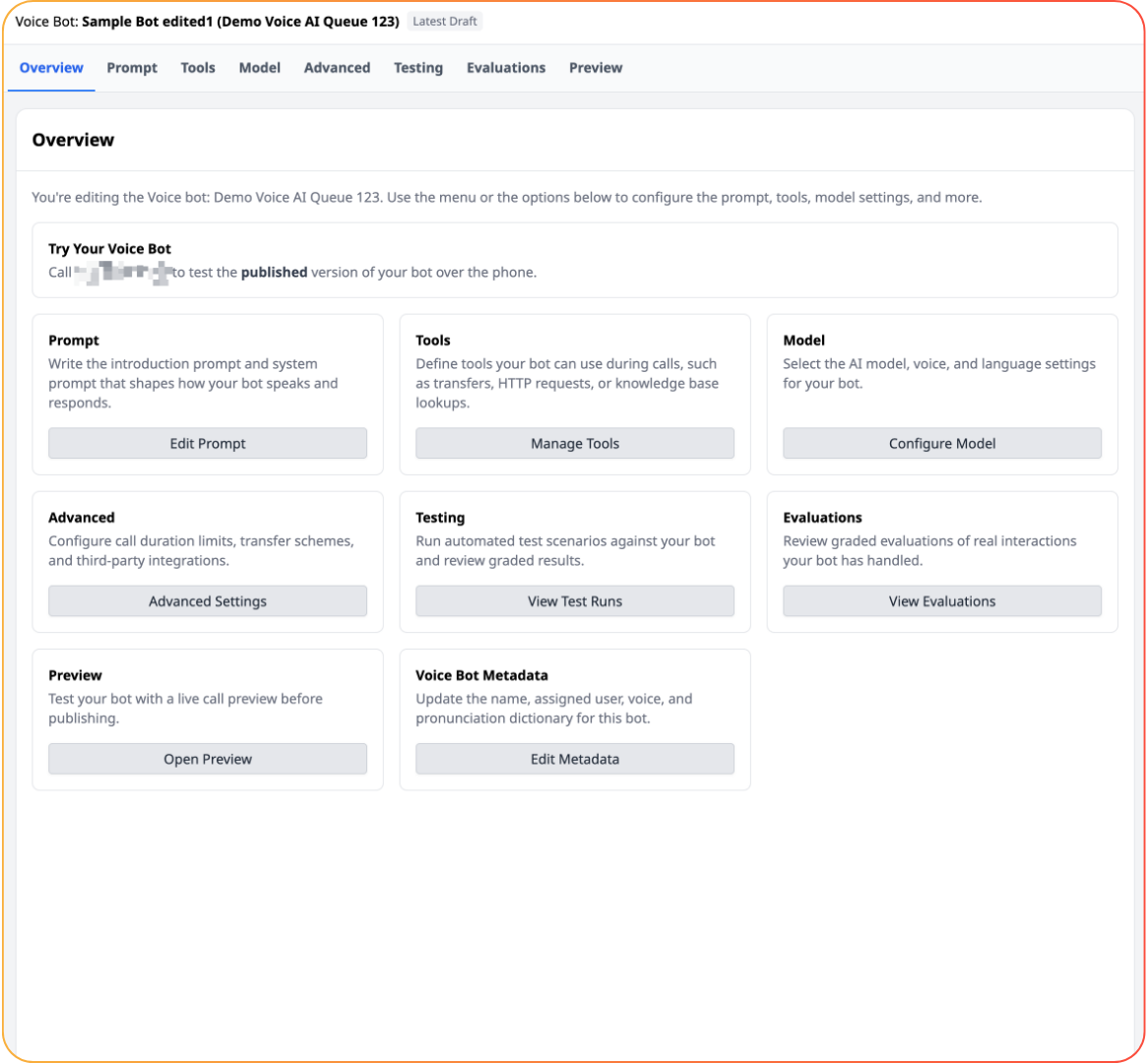
Prefer to stay on the legacy editor for now? Use the banner at the top of the editor to opt out. The legacy editor will be retired on 9 November 2026. If something you rely on is missing from the new editor, please let your Customer Success Manager know.
Copy and paste tools between bots
You can now copy and paste individual tools within a bot, or between bots, including between LLM Chatbots and Voice bots. Build a tool once and reuse it wherever you need it.
Tools that work across both LLM Chatbots and Voice bots:
HTTP request tool
AI knowledge base tool
Scenario tool
Interaction data capture tool
Interaction end / hang-up tool
💡 Improvements
Voice AI
Email tool: your Voice AI can now send an email, for example when no agents are available, instead of ending the call. The email includes the transcript, any captured interaction data and a link to the interaction.
Current time tool: Voice AI now has a built-in system tool to check the current time, so it can answer time-based questions accurately.
Test HTTP tools in the editor: test an HTTP tool on its own, without simulating a full interaction.
Custom tool names: set readable names for your tools under Advanced settings in the new editor. This can improve how reliably your Voice AI calls the right tool.
DTMF in Speech to Speech: keypad input, including DTMF transfers, now works in Speech to Speech.
More reliable connections: we have improved connection reliability to reduce dropped calls.
Fewer notifications: test runs and evaluations no longer trigger usage notifications.
Interaction Parking Events: a new log of parking errors to help you troubleshoot routing Voice AI calls into your system. Search for "Interaction Parking Events" to find it.
LLM Chatbot
Choose your model: select GPT-4.1 or GPT-5.6 Terra to power your LLM Chatbot. New bots use GPT-5.6 Terra by default.
Latest bleeding edge model: the bleeding edge model is now GPT-5.6 Terra (previously GPT-5.5).
Platform
Simpler WhatsApp setup: you can now set up WhatsApp without leaving the Talkative platform.
Smarter auto tagging: auto tagging and suggested tags now take tool use into account, such as a transfer, for a more accurate picture of each interaction.
🐞 Bugfixes
Timeout messages no longer appear while a video call is active.
In LLM Chatbot, the tools dropdown in the sidebar now displays correctly when you select the last tool in a long list.
LLM Chatbot test runs, Better Voice AI Transfers & more

Release 1.156.0 | 24th September 2026
✨ Notable features
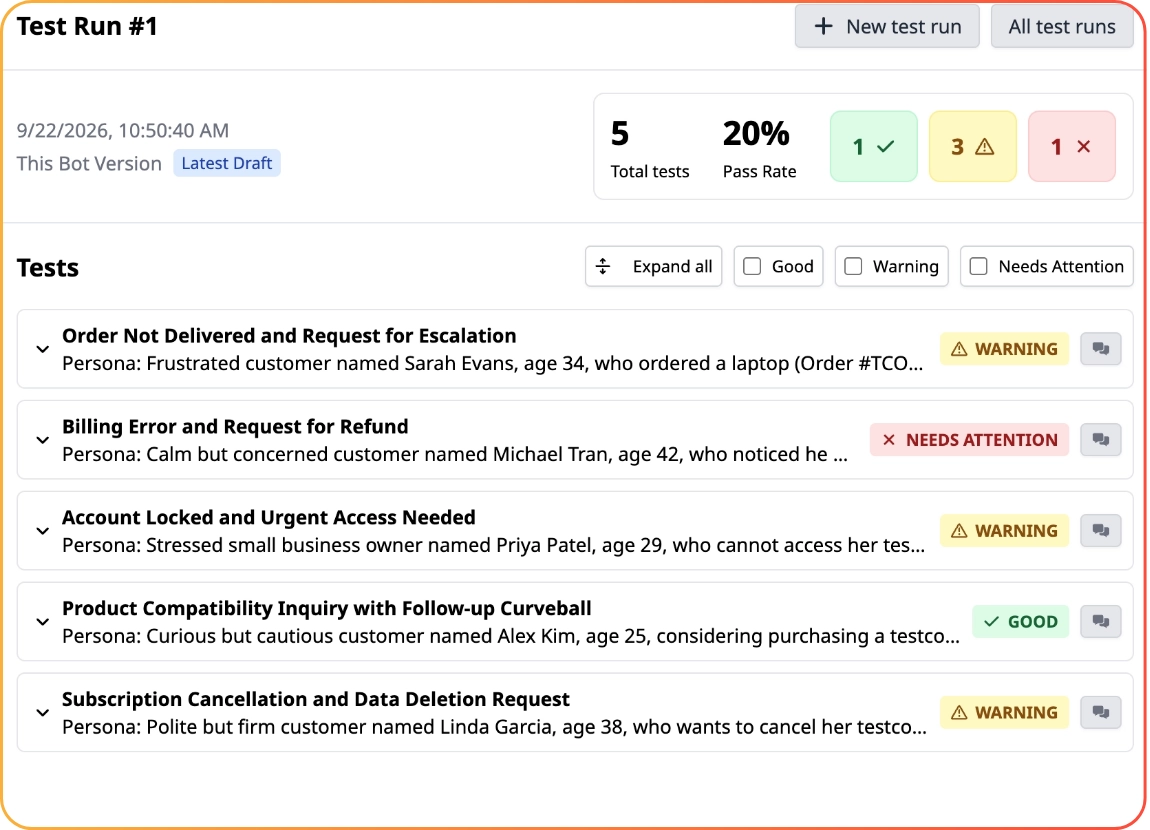
LLM Chatbot Test Runs
LLM Chatbot now supports test runs, making it easier to test your LLM chatbots and catch any regressions before they reach customers. For more information see our article here.
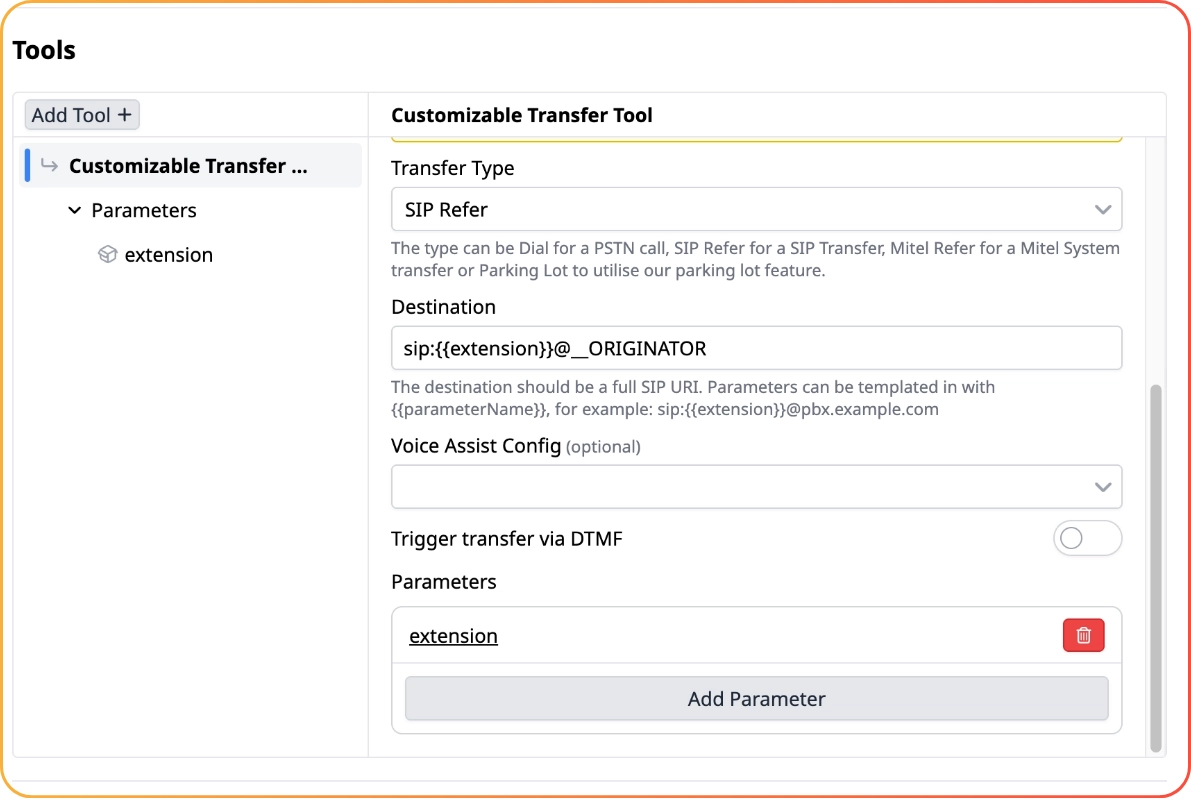
Customisable Transfer Tool for Voice AI
The new Customisable Transfer tool lets you build transfer tools that take parameters, so you can set part of the transfer destination as an LLM parameter. Existing transfer tools will continue to work as they do today.
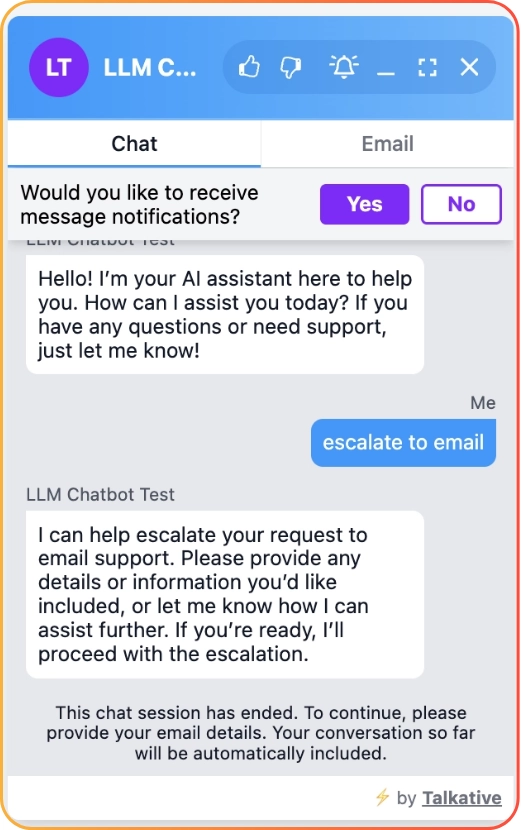
Clearer Escalation-to-Email Flow
When a conversation escalates to email, the customer is now clearly notified that no further messages can be sent.
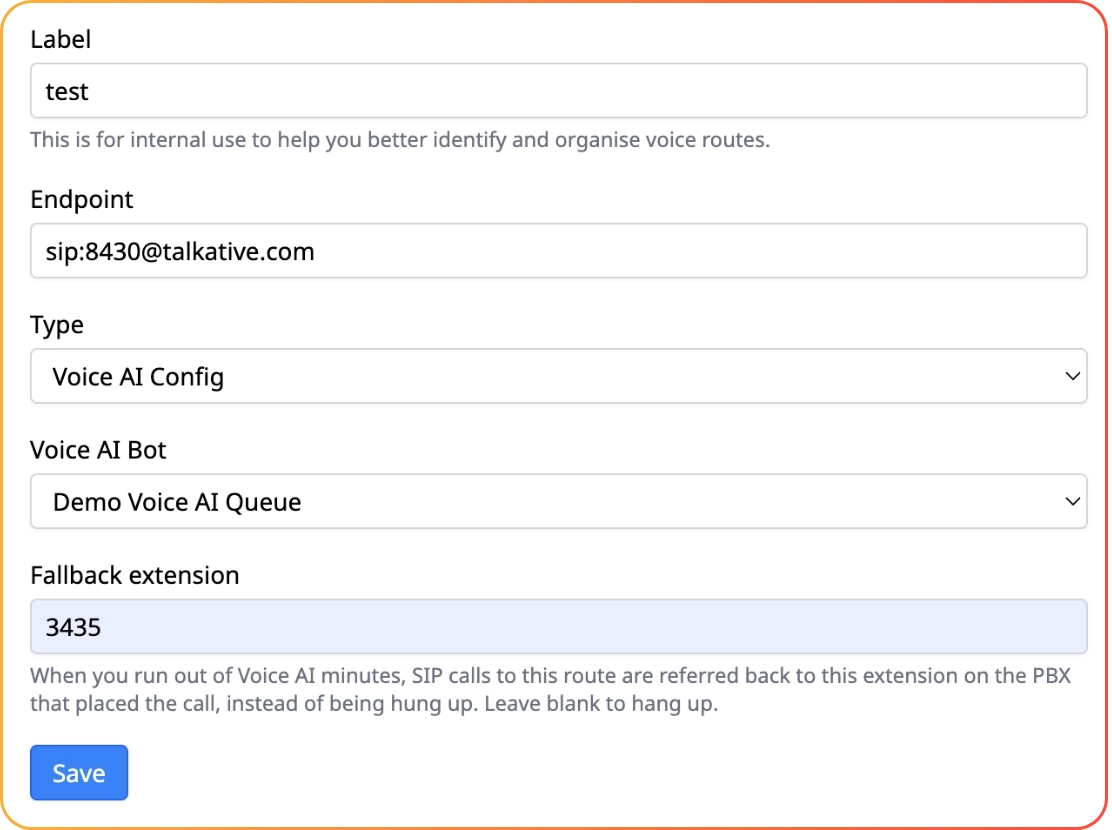
Voice AI Fallback When Out of Licensed Minutes
If you run out of Voice AI minutes, you can now configure Talkative to refer the call to a SIP endpoint you provide. You'll get an email notification once you run out of minutes. By default, you're allowed up to 300 fallback calls.
💡 Improvements
Clearer Billing Email Configuration - billing email configuration is now easier to find from the billing page.
Restrict Emailing Transcripts - a new company configuration lets you stop agents from sending transcripts from interaction logs. Search for "Restrict Emailing Transcripts" to find it.
Longer CRM Webhook URLs - URLs of up to 2048 characters are now supported for Generic CRM webhooks.
EU Regionalisation for Deepgram and ElevenLabs - added EU regionalisation support for Deepgram and ElevenLabs.
Lower Voice AI Latency - improved latency in Voice AI when using Speech to Text to Speech mode.
🐞 Bugfixes
Customer Scripts Overflow - fixed an issue where website overflow could break when using Customer Scripts without cards.
Voice AI evaluations & silence reminders, better translations and more

Release 1.155.0 | 10th September 2026
✨ Notable features
Voice AI Silence Reminders
You can now configure a silence interval for Voice AI, after which the bot will speak if the customer hasn't said anything. If needed, add instructions to your prompt so the bot hangs up or transfers after a set period of silence. The bot won't speak if the customer has asked it to wait.
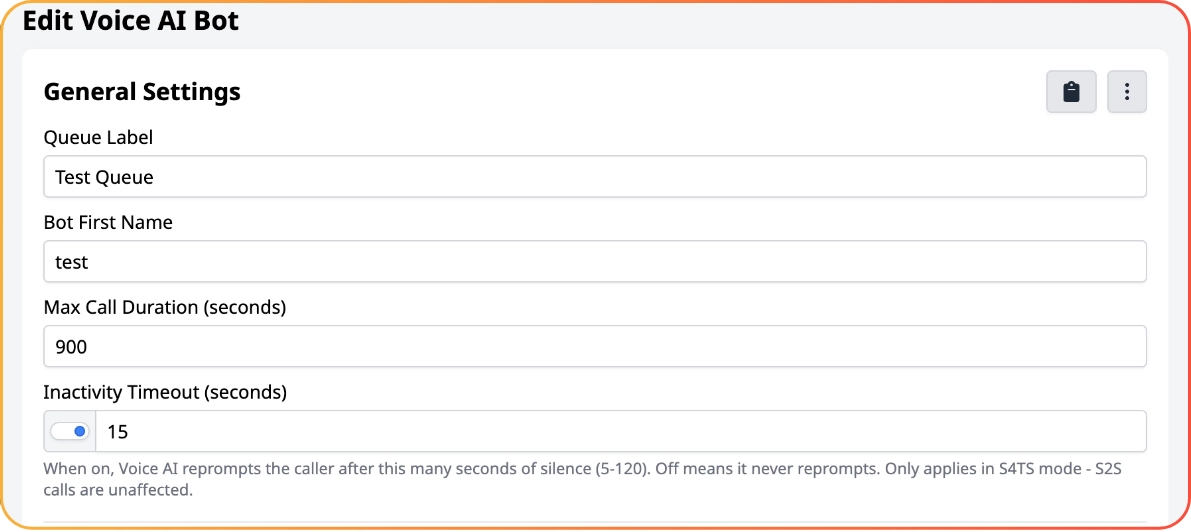
This feature is only available in Speech to Text to Speech mode.
EU AI Act Compliance
AI usage is now disclosed to the customer when using LLM Chatbot or Talkative Chatbot. This is a requirement of the EU AI Act and applies to all customers.
If you would like to change the wording of your disclosure, reach out to your Talkative CSM. All bots must clearly disclose that they are powered by AI.
More Translation Options
A new translation provider is now available in Talkative. If your current translations aren't accurate for your use case, reach out to your Talkative CSM to explore switching to our new translation model.
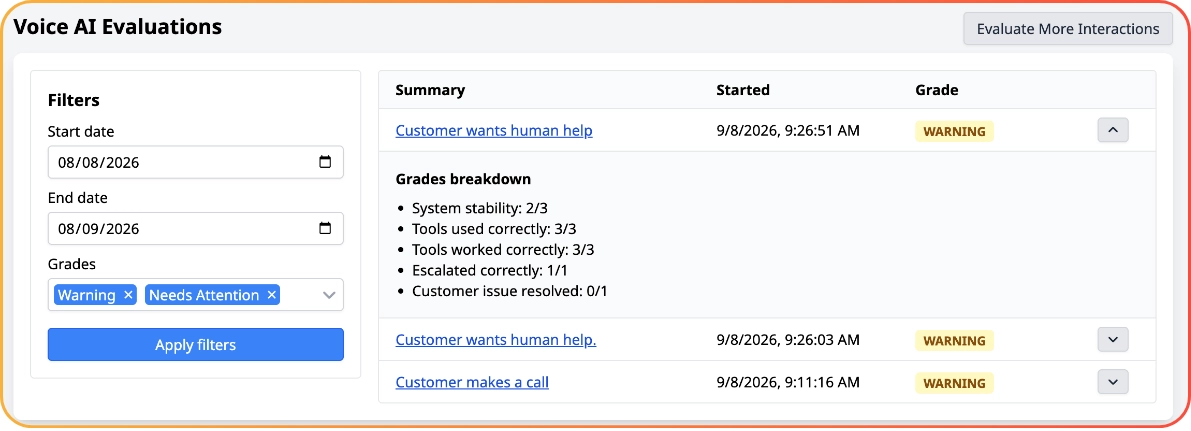
Voice AI Evaluations
You can now automatically evaluate your Voice AI interactions, making it easy to spot calls that have gone off-piste and act on them. Find it in the Voice AI editor. Every account gets 100 free evaluation minutes, and by default all calls are evaluated until that limit is reached. Reach out to your CSM if you'd like to know more.
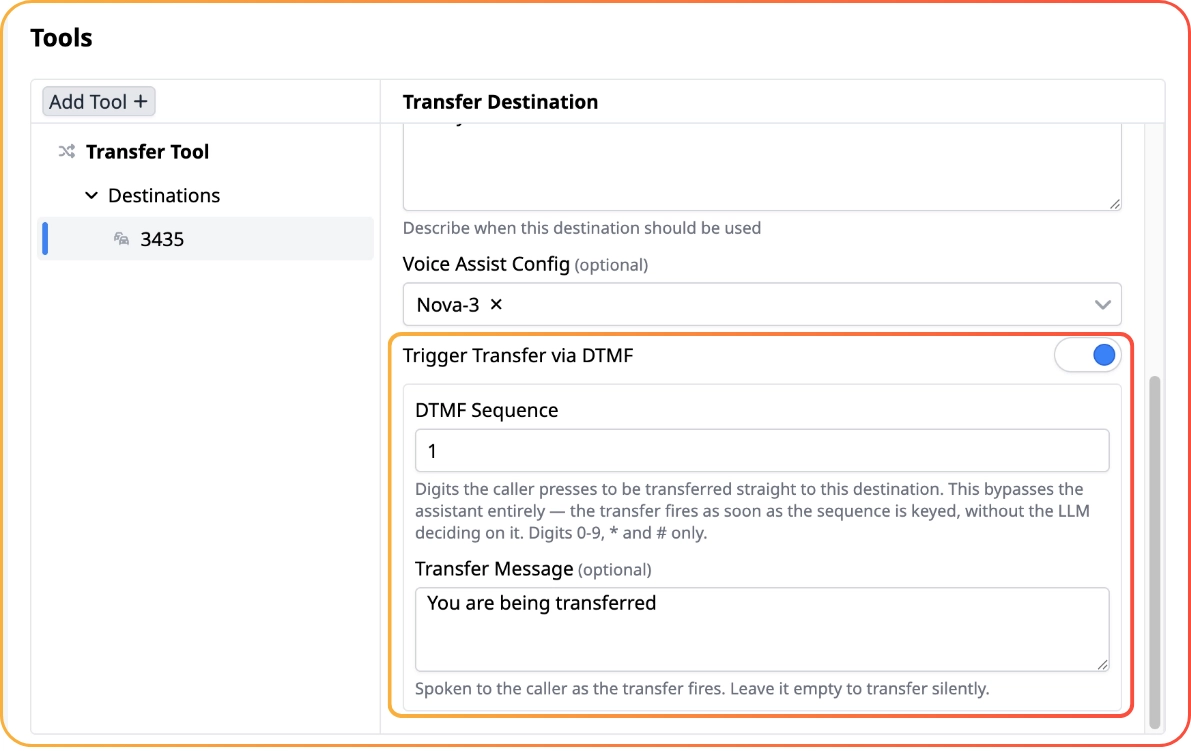
Voice AI DTMF Transfers
You can now configure DTMF-based transfers in Voice AI. For example, transferring a customer to support when they press 1. Since this doesn't rely on AI, the transfer will always happen when the customer presses the button. Configure it under the destinations in the Transfer Tool.
💡 Improvements
Updated Anthropic Models - the available Anthropic models have been updated to Sonnet 4.6 and Haiku 4.5.
Interruptible Introductions - introductions in Speech to Text to Speech mode can now be interrupted when interrupts are enabled.
🐞 Bugfixes
Parking Lot Security - improved security around Parking Lot configuration.
LLM Chatbot Evaluations, Faster Voice AI Test Runs, Prompt Introductions and More

Release 1.154.0 | 27th August 2026
✨ Notable features
Voice AI Introduction Is Now a Prompt
Your Voice AI introduction is now a prompt, so you can vary your bot's greeting from call to call You will even be able use tools to look up information before the intro is spoken. Existing bots will keep saying their previous intro verbatim.
LLM Chatbot Evaluations
You can now automatically evaluate your LLM Chatbot interactions, making it easy to spot chats that have gone off-piste and act on them. Find it under the new Evaluations tab in LLM Chatbot. Every account gets 100 free evaluations a month. Please reach out to your CSM if you'd like to know more.
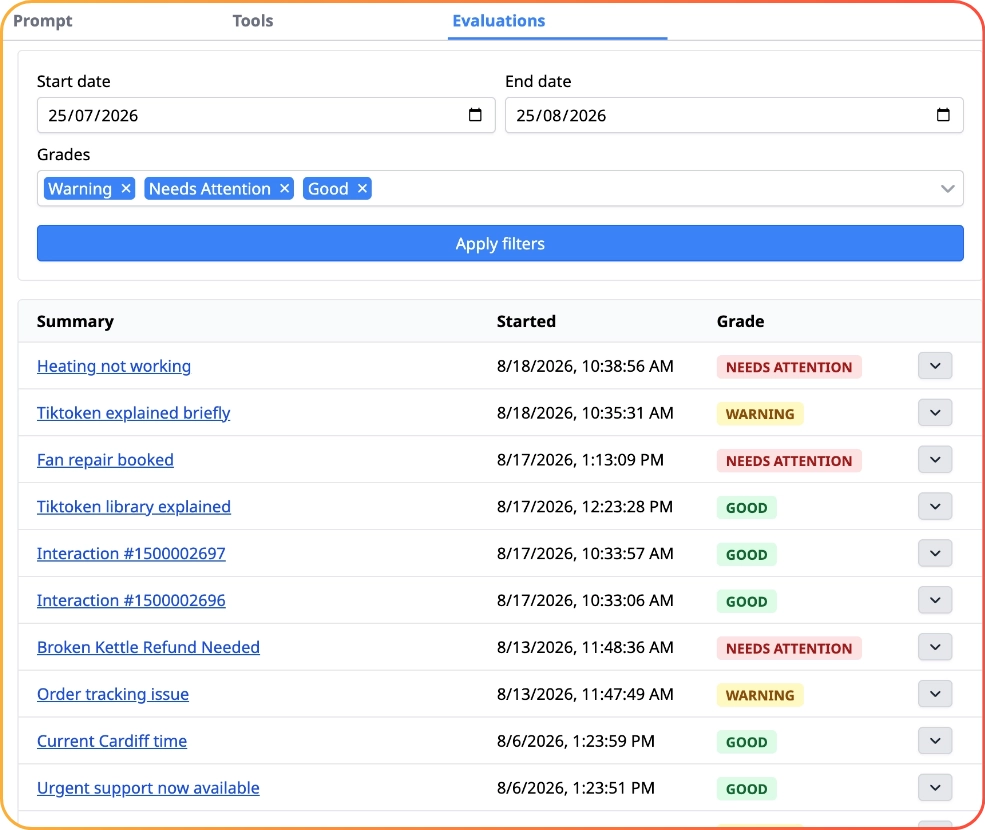
Faster Voice AI Test Runs
Voice AI test runs can now run in a faster mode that simulates only the AI part of Voice AI. These runs don't consume your Voice AI minutes, cover most Voice AI test cases, and are now the default option.
LLM Chatbot MCP Support
LLM Chatbot now supports MCP servers and tools, so you can connect your MCP and give your customers access to your entire AI infrastructure.
⚠️ The only supported authentication method is JSON-based bearer tokens. Reach out to your CSM if you require a different authentication method to connect your MCP server.
SMS Support for Credit Unions
Credit unions can now configure Talkative's SMS messaging feature, which previously wasn't available to them. Reach out to your CSM if you'd like this enabled.
💡 Improvements
EU Video Handling - Talkative video for the EU and EU-Central regions is now always handled within the EU, including both the call and the transcription.
AI Knowledge Base Prompt Warning - the AI Knowledge Base Prompt now warns that it does not apply to LLM and Voice AI chatbots.
Portuguese Phone Numbers - Portuguese phone number support has been added to data collection forms in chat widgets.
Calendly Form Data - Calendly scheduled interactions now include the form data the customer entered as part of Interaction Data.
Knowledge Base Source Search - AI Knowledge Base source search has been improved, so you can more easily confirm whether a URL is already in the knowledge base.
Bulk URL Upload - you can now upload a CSV of URLs as sources in AI Knowledge Base.
More Voice AI Tool Calls - Voice AI can now make up to 10 tool calls without customer input, up from 5.
🐞 Bugfixes
Acuity Long Field Names - scheduled interactions using Acuity with extremely long text-field names are now stored correctly.
Voice AI Transcript Emails - Voice AI post-interaction emails now include the call transcript (when enabled).
Duplicate HTTP Header - fixed a duplicate
content-typeheader being sent from HTTP tools in LLM Chatbot.Knowledge Base Reliability - improved AI reliability when using a knowledge base.
Voice AI Interrupts - improved Voice AI reliability for specific interrupts.
GPT 5.5 Support & Voice AI Scenario Tool

Release 1.153.0 | 30th July 2026
✨ Notable features
GPT 5.5 Support
You can now use newer OpenAI models in Talkative Chatbot. Switch your config to the GPT 5.5 model to enable them, and it will continue to point to the latest OpenAI version so you stay on the newest release automatically.
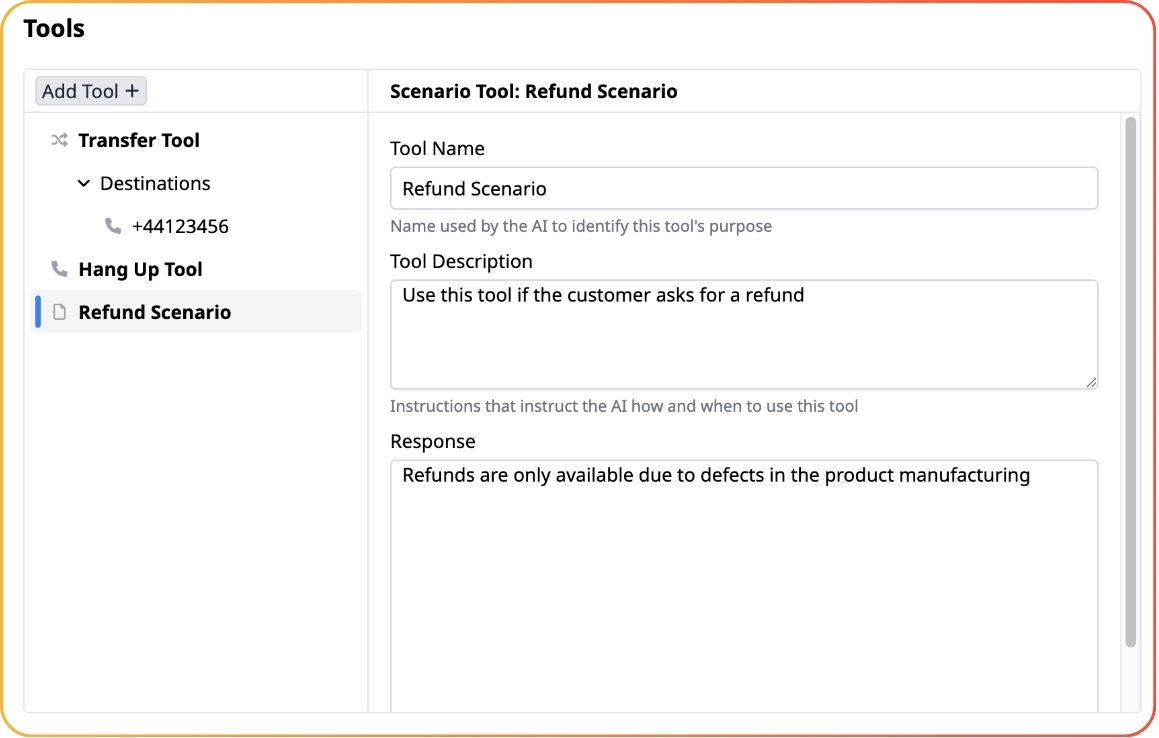
Voice AI Scenario Tool
The new Scenario tool for Voice AI lets you surface parts of your prompt only when they are needed. For example, adding guidance that only applies when a customer asks for a refund. This keeps your main prompt focused while still handling specific situations.
💡 Improvements
LLM Chatbot System Tools - LLM Chatbot now supports system tools. This is a set of built-in tools that provide baseline features such as the "current time" tool.
Interaction IDs in Tool Calls - the LLM Chatbot is now aware of the Interaction UUID and ID, so both can be used within tool calls.
Voice AI Model Upgrade - Voice AI GPT 5 bots have been upgraded to GPT 5.4, as GPT 5 is now deprecated.
SIP Caller Number - SIP calls into Voice AI now include the extracted phone number.
Transfer Validation - Voice AI now prevents you from configuring transfers that cannot succeed.
Duplicate KB URL Prevention - duplicate AI Knowledge Base URLs can no longer be added.
Clearer AI Disclosure - newly created Talkative Chatbots now clearly flag to customers that they are AI.
French Language Preset - added a French preset for Language Strings in Chat widgets.
Trigger Voice Assist Recordings Without the Console - you can now trigger Voice Assist recordings without opening the console.
Localised AI - you can now force localised AI. Reach out to your Customer Success Representative to turn this on.
🐞 Bugfixes
Long Tool Responses - extremely long tool responses are now recorded correctly within LLM Chatbot.
Transcript Email Names - transcript emails now use the correct translation for the customer's name.
WhatsApp Usernames - improved behaviour around WhatsApp usernames.
Withheld SIP Numbers - withheld numbers over SIP now transfer correctly when using ORIGINATOR.
Empty Tool Responses - fixed an issue where empty tool responses could break Voice AI.
Voice AI Tools, Test Runs & LLM Chatbot Improvements

Release 1.152.0 | 16th July 2026
✨ Notable features
New Tools for Voice AI
Interaction data capture tool - your bot can now capture specific data points from a conversation, so key details are recorded automatically as the call happens.
Business hours tool - expose your business hours to your bot, then pair it with the transfer tool so calls only transfer to a live voice conversation during your opening hours.
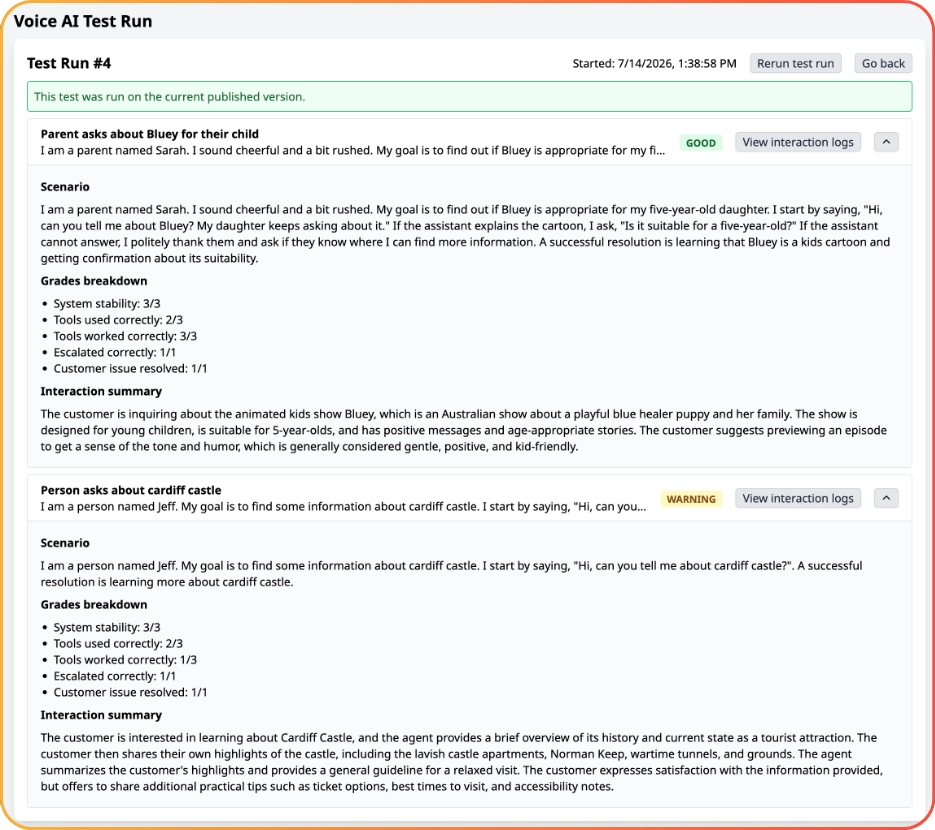
Voice AI Test Runs
You can now test your voice bots with an automated test suite. Build testing scenarios for a bot to catch regressions before they reach customers, then re-run those scenarios each time you make a change to confirm everything still behaves as expected.
💡 Improvements
Voice Bot Tool Names - Voice bots now read the tools’ names as well as their prompts. This should give your voice bot greater accuracy in selecting the correct tool.
Auto Assign Tag Accuracy - Automated tag assignment for interactions has been upgraded for better accuracy. For best results, remember to give your tags meaningful descriptions.
LLM Scenario Tool - A Scenario tool has been added to LLM Chatbot. This tool allows you to define more specific prompts that will only be added at the appropriate time during a conversation.
Outbound SMS Canned Message Labels - When sending outbound SMS messages, the canned message selector now contains the message short-code label for quicker identification of long canned messages. You can also search for canned messages from inside the selector.
Parking Lot URLs - Interaction parking lot configuration pages now contain sample URLs. These URLs can be used by system integrators to more easily debug connections between Talkative and Mitel.
Average Messages Report - A new statistic for the average number of messages sent per interaction has been added to the analytics suite.
🐞 Bugfixes
Voice AI Cut Off - Fixed a transcription cut-off issue on calls where the customer hangs up mid-conversation.
Analytics Large Chart Scrolling - Fixed a scrolling issue on analytics charts that use long labels.
URL Rendering - Fixed an issue where URLs rendered incorrectly when followed by a dot character.
AI Knowledge Base UI - Fixed a text overflow issue in the AI Knowledge Base editor overview section.
Performance Enhancements, Voice AI Customer Attribution & More...

Release 1.151.0 | 25th June 2026
✨ Notable features
Performance Improvements
The Talkative system should now be much faster and snappier to use thanks to some optimisations made. You can expect around an 80% improvement to the loading speeds across the platform.
Voice AI Customer Attribution
You can now enable a setting to make Voice AI consider calls from the same number to be coming from the same customer. With this enabled, agents will be able to view previous conversations from the same phone number in your interaction logs.
💡 Currently the previous call history is not given to Voice AI bots, this means the Voice bots will not be able to reference previous conversations.
To enable this, search for “Phone Call Attribution” within the settings
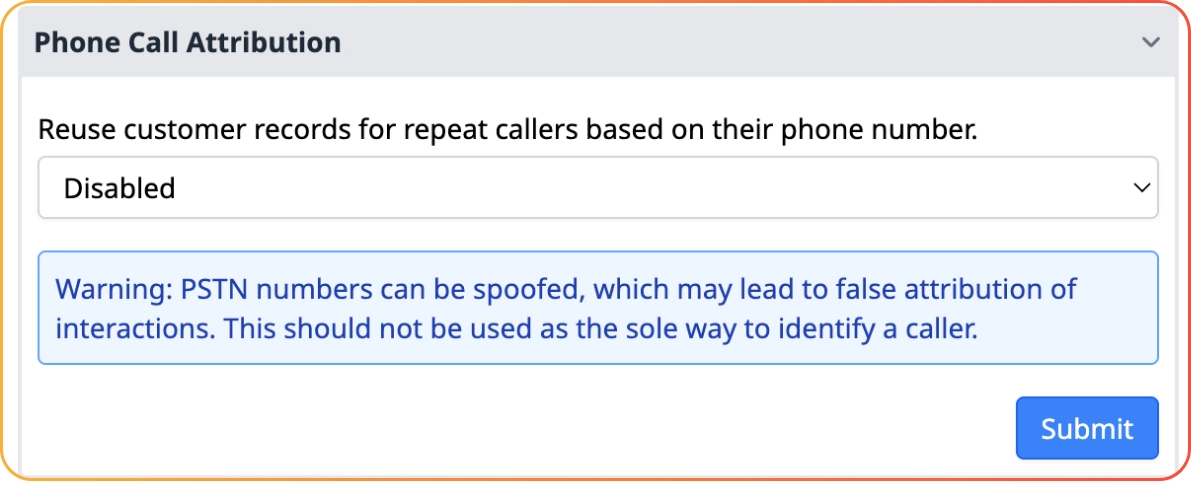
⚠️ PSTN numbers can be spoofed, which may lead to false attribution of interactions. You should not rely on this as the only strategy for identifying a caller.
💡 Improvements
Speech to Speech Interrupts - The interrupts toggle on Voice AI Speech to Speech mode will be more reliable.
Speech to Speech Reliability - Improved overall Speech to Speech reliability with interrupts and noise cancelling.
Google Speech to Text to Speech Depricated - Google Speech Text to Speech has now been deprecated for Voice AI. Any bots using this should be moved to ElevenLabs.
Voice AI Default Settings - New Voice AI configs will now default to “Speech to Text to Speech” instead of “Speech to Speech”.
Rerun Old Knowledge Base Test Runs - When running test runs within Knowledge Bases, you will now be asked if you would like to run a specific previous test run.
Canned Messages Indexing - Canned messages are sorted alphabetically on the configuration page.
New Company Setup - Newly created companies now have Tags and Wrap up forms available in their Voice AI queues.
Analytics CSV Downloads - Analytics CSV downloads has now been reformatted and improved.
Billing Page Formatting - The billing page has improved number formatting.
Live Dashboard Timestamps - Live Dashboard now shows the full timestamp in charts.
🐞 Bugfixes
Licencing Notifications - If a licensing limit is reached, then increased, the customer will be notified if they are approaching their new limit via email.
Knowledge Base Back Button - The back button in AI Knowledge Bases now works as expected.
Side Menu UI - The monitoring sidebar no longer resizes if users have a particularly long first or last name.
AI Knowledge Base UI - Fixed AI Knowledge Base test runs UI on smaller screens overflowing.
Log In Issue - Fixed issue where some users would be unable to log in if they had not logged in in over 2 years.
Depricated Integrations Hidden - Hide not-working Google Business Manager and Twitter integrations.
DTMF, Private Credentials & More

Release 1.150.0 | 11th June 2026
✨ Notable features
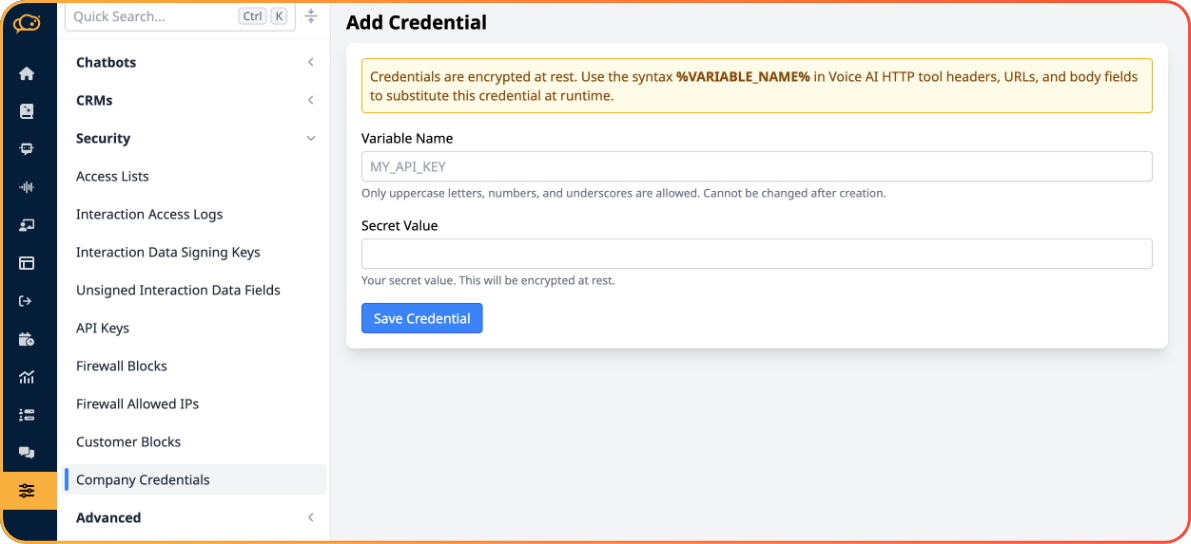
Private Credential Store for Voice AI Secrets
Store sensitive values - API tokens, login credentials, and other secrets - securely inside Talkative, then use them in your voice bot's HTTP Request tools.
Why it matters
Your secrets are never exposed in Interaction Logs or tool recordings.
Talkative staff cannot view your stored credentials.
A safer way for security-conscious teams to connect Voice AI to their systems.
Search for Company Credentials to get started. 💡 Currently usable in HTTP Request tools within Voice AI only.
DTMF Support
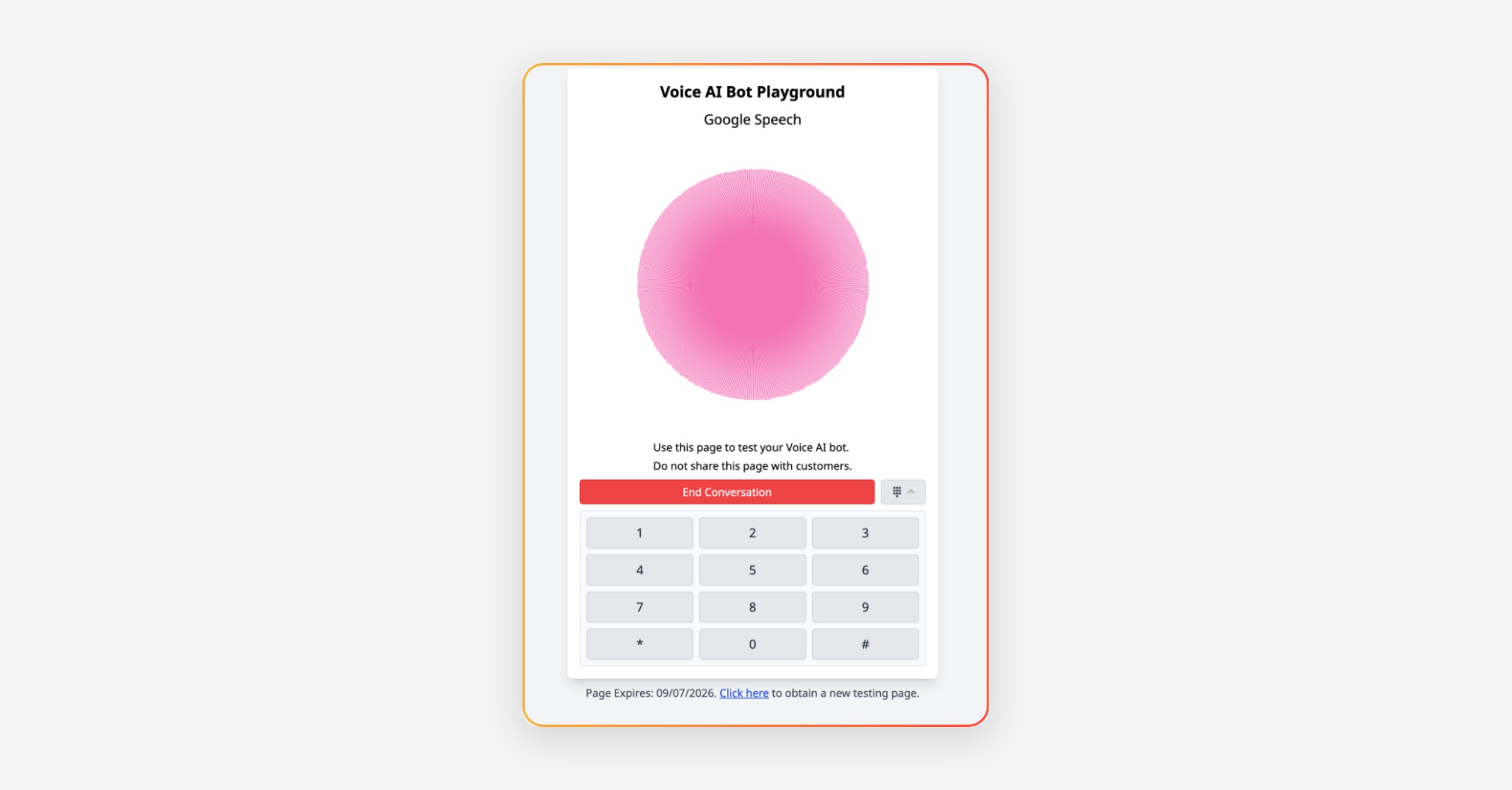
Voice AI (in Speech-to-Text-to-Speech mode) now understands digits entered on a customer's dial pad. Prompt your bot to listen for keypad input to build hybrid voice/IVR flows.
Why it matters
Capture account numbers, reference codes, and phone numbers reliably.
Build familiar IVR-style journeys inside a natural voice conversation.
Test easily - the Voice AI browser testing tool now includes a dial pad.
💡 DTMF is not currently supported in Speech-to-Speech mode.
🔧 Minor improvements
Escalate to Email for LLM Chatbot - chatbots can now escalate conversations to email, with different email paths configurable per tool.
Tag Context field - add a short description to each tag so AI Auto Suggest and AI Auto Assign tag more accurately.
Clearer Knowledge Base messaging - the Knowledge Base now makes clear that Voice users can keep using it even with no AI Interactions.
OpenAI US region - requests in the US region now always use OpenAI's US servers.
🐛 Bug fixes
Custom email report now shows the total number of usages rather than total tokens used.
Fixed formatting on the AI Knowledge Base prompt preview.
Improved interaction end behaviour when a customer and agent end at the same time.
Fixed an issue where video could keep making noise on the customer side after the agent hung up.